


WordPress 7.0 is more than another routine update. It marks a clear shift towards a smarter, more assisted WordPress experience, with new AI integrations, better design control, visual revisions, improved mobile editing and performance updates designed to make websites easier to create and manage.
For business owners, this matters because running a website is rarely just about publishing a few pages. You need to write content, update images, improve page layouts, check how your site looks on mobile, manage plugins, review changes and keep the experience fast for visitors.
WordPress 7.0 does not remove the need for good planning or human judgement, but it does make many common website tasks easier to manage. The biggest change is AI.
AI is becoming part of the WordPress experience
The standout feature in WordPress 7.0 is the introduction of AI foundations.
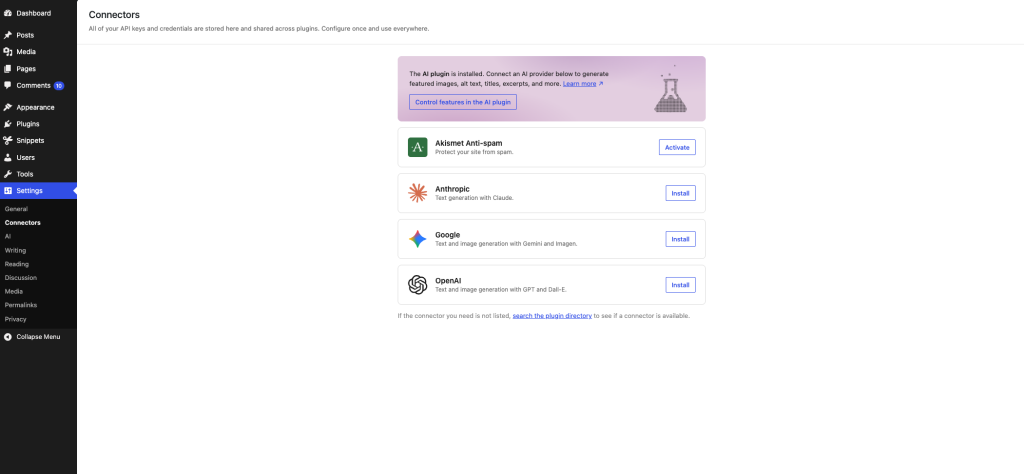
This does not mean WordPress is suddenly turning into a fully automated website builder. Instead, WordPress 7.0 introduces a more structured way for AI tools and external services to connect with your website through a new Connectors screen.
That may sound technical, but the idea is simple. Rather than every plugin managing external AI connections in its own way, WordPress is creating a more centralised system for those connections. Over time, this could make AI tools easier to manage, easier to control and more consistent across the WordPress experience.
With the optional AI plugin, users can access AI-powered tools directly inside the editor. These tools can help with tasks such as:
- Creating title ideas
- Generating excerpts
- Creating and editing images
- Suggesting alt text for images
- Supporting routine content tasks inside the editor
This is a big deal for WordPress users. A lot of website management involves small but time-consuming tasks. AI gives website owners a way to move faster, get past blank-page moments and keep their site updated without needing to start every task from scratch.
Remember, you should still check accuracy, brand tone, SEO intent, accessibility and whether the content genuinely helps your audience. WordPress 7.0 gives you more support, but the best results still come from combining AI assistance with human judgement.
The additional AI features are currently available via an optional AI plugin created by the WordPress team.
Smarter navigation gives visitors a clearer path
WordPress 7.0 introduces a dedicated canvas for designing navigation overlays, giving website owners more control over how menus appear.
Instead of being limited to a basic list of links, you can create more considered navigation layouts with columns. You can start from a pre-built template or design your own overlay from scratch.
This matters because navigation has a direct impact on how people use your website. If visitors cannot quickly find your services, pricing, contact page, product categories or support information, they are more likely to leave.
For business websites, better navigation can help guide visitors towards the pages that matter most. A clearer menu can make a site feel more professional, easier to explore and more useful on mobile devices, where space is limited and every tap matters.
Visual revisions make website editing less risky
Updating a website can be stressful when you are not sure what changed or whether you can easily go back.
WordPress 7.0 helps solve this with visual revisions. Instead of digging through a basic revision history, you can have a look through previous versions of a page or post using a timeline slider and see changes marked visually.
This is especially useful for business-critical pages such as your homepage, service pages, landing pages, pricing pages and contact pages. These are often the pages that get updated most often, but they are also the pages where mistakes can have the biggest impact.
Visual revisions make editing feel safer. You can test a new layout, update copy, change a section or refresh a page with more confidence because you have a clearer way to review what changed and restore an earlier version if needed.
For teams, this can also make collaboration easier. If multiple people work on the same website, visual revisions give everyone a better way to understand what has been adjusted.
Patterns are easier to work with
Patterns are one of the most useful parts of the WordPress block editor, but they can sometimes feel fiddly for less experienced users.
WordPress 7.0 improves this by allowing patterns to behave more like single blocks. You can drop a pattern onto a page, update the text and images, adjust styles from the inspector and keep moving without needing to hunt through nested blocks just to make a small change.
For more advanced edits, you can still open the full pattern editing options.
This is a practical improvement because patterns are often used for common website sections, such as:
- Testimonials
- Feature grids
- Service summaries
- Call-to-action sections
- Pricing blocks
- Contact sections
- Promotional banners
For everyday website owners, this makes page building feel less technical. You can use professionally structured sections without needing to understand every layer of the block layout.
Better control over mobile layouts
WordPress 7.0 also gives users more control over which blocks appear at different screen sizes.
This is useful because desktop and mobile visitors often need different experiences. A large image, detailed feature section or complex layout might work well on a desktop screen but feel crowded on a phone.
Being able to show or hide specific blocks by screen size gives website owners a simpler way to create cleaner mobile pages. You might show a shorter call to action on mobile, simplify a long section, remove a decorative element or keep the most important information higher on the page.
That matters because mobile optimisation is no longer optional. Many people will visit your website from a phone before they ever see it on a desktop. A site that is easier to navigate on mobile can create a better first impression and help visitors take action faster.
Performance improvements work quietly in the background
Some of the most valuable WordPress updates are the ones visitors never directly notice.
WordPress 7.0 includes performance improvements designed to help pages load more efficiently. This includes better image loading prioritisation, more reliable on-demand block stylesheet loading in classic themes and improvements that can help reduce render-blocking scripts.
In simple terms, WordPress is getting better at deciding what needs to load first and what can wait.
This is important because website speed affects user experience. A faster website feels smoother, keeps visitors engaged and can support stronger conversion potential. For businesses, that can mean more people staying on the site long enough to read, enquire, book, buy or get in touch.
It is worth remembering that WordPress performance is not just about the WordPress version you use. Your hosting environment, theme, plugins, caching, image optimisation and general site maintenance all play a role.
That is why it helps to run your WordPress website on web hosting built to support speed, reliability and growth.
Accessibility improvements help create better websites
WordPress 7.0 continues to improve accessibility.
These updates include improvements to media management, voice control usability, colour contrast, editor navigation and block interactions.
Accessibility is often discussed as a technical requirement, but it is also about creating a better experience for real people. A more accessible website can be easier to use for people relying on assistive technologies, people navigating with keyboards, people using mobile devices and people who simply need clearer contrast or simpler interactions.
For businesses, accessibility is part of creating a more professional website. It reduces unnecessary friction and helps more visitors use your content, products or services with confidence.
More design flexibility without rebuilding your site
WordPress 7.0 also brings several design improvements that make the platform feel more modern and flexible.
The font library now works across all WordPress themes, not just block themes. This means users can browse, install and manage fonts directly from the editor, even if they are not using a fully block-based theme.
There is also a refreshed admin experience, with updated buttons, inputs, a new default colour scheme and smoother transitions between admin pages.
Another useful addition is the new Icon block, which lets users add icons from a built-in library and style them to match their design.
These might sound like smaller changes, but they make WordPress easier to polish without requiring a full redesign. For a small business website, that could mean improving the look of service sections, feature lists, contact areas or call-to-action blocks without needing to rebuild the entire site.
Should you update to WordPress 7.0 straight away?
WordPress updates are important, but major version updates should still be handled carefully.
Before updating to WordPress 7.0, it is worth taking a few practical steps:
- Back up your website
- Check whether your theme supports the latest version
- Review plugin compatibility
- Update plugins and themes where appropriate
- Test the update on a staging site if your website is business-critical
- Check key pages, forms, checkout flows and layouts after updating
This is especially important for ecommerce websites, membership sites, booking websites and high-traffic business websites where downtime or broken functionality can have a direct impact.
If your site is simple, the update may be straightforward. If your site relies on a lot of plugins or custom functionality, take a more cautious approach.
The biggest takeaway from WordPress 7.0 is AI
WordPress 7.0 is not just a feature update. It is a step towards a more user-friendly, AI-assisted website management experience.
The AI features are the standout change because they show that AI is becoming part of the broader WordPress ecosystem, not just something added through separate tools. For website owners, this can make creating and managing content easier, faster and less overwhelming.
Combined with smarter navigation, visual revisions, easier pattern editing, better mobile control, performance improvements and accessibility updates, WordPress 7.0 gives users more confidence to keep their websites moving forward.
Planning on building something new with WordPress?
If you are planning to build a new WordPress website or want a stronger foundation for your existing one, our WordPress web hosting gives you the speed, reliability and Australian-based support you need to get the most out of WordPress.
Explore our web hosting services today and give your WordPress website a reliable place to grow.

