
Browse by Popular

Domain Name
- What is a domain name?Eligibility criteria for registering .AU domain namesPremium domain names explained

Web Hosting
View All
Email Hosting
- Outlook 365 (Classic) Email Setup GuideMail app setup for iOS (iPhone + iPad)Gmail (webmail) email setup

Google Workspace
- Getting Started with Google WorkspaceGoogle Workspace support resourcesTransferring an existing Google Workspace service to VentraIP

Account
- How do I reset my VIPcontrol password?How do I create a VentraIP account?How can I see who accessed my VentraIP account?

Troubleshooting
- How do I clear my browser cache?Troubleshooting a ‘500 internal server' errorTroubleshooting with a ping test
Corrections on Domains Registered Under a Trust
auDA changed its policy in 2021 to no longer allow the Trust entity to register Domain Names, requiring that they be registered to the Trustee of the Trust, rather than directly to the Trust.
To resolve this, you will have to perform a correction to update the domain’s registrant details to be registered under the Trustee.
Note: If you are unable to update your registrant details, this may result in the suspension or deletion of your domain if it’s not resolved before renewal.
Updating your registrant details via a correction
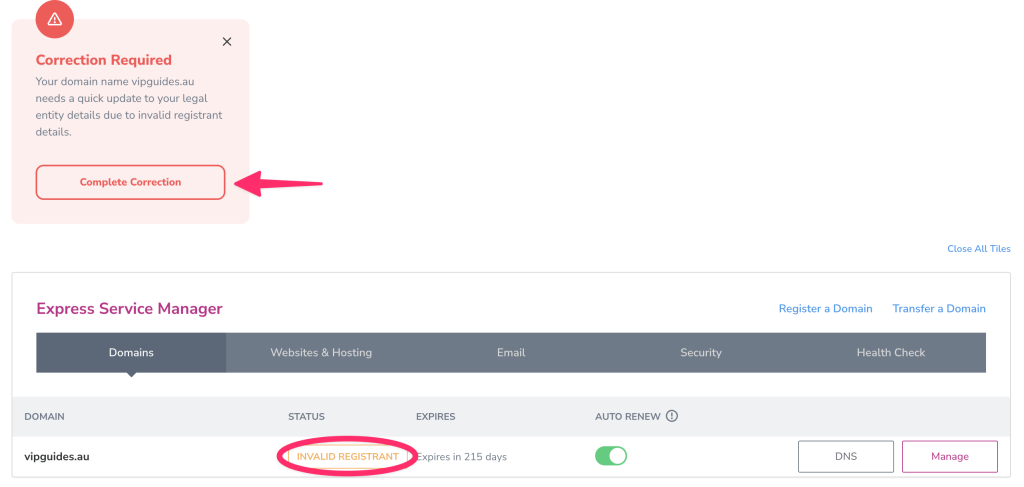
To check to see if your domain name requires actioning, you’ll be able to see either a tile within the VIPcontrol dashboard, and the ‘Invalid Registrant’ status next to your domain name shown below:
If your domain has more than 90 days till expiry:
If your domain has more than 90 days till expiry, you are able to perform a correction within VIPcontrol.
- Login to VIPcontrol.
- Click on ‘Complete Correction’ on the dashboard, or go to ‘My Services’ → ‘Domains’
- Click on ‘Manage’ next to the domain name → ‘Correction Request’.
- From there you will be able to initiate the correction on the domain name and enter your updated registrant details. You will also be able to view the Correction link directly, and resend the email.
If your domain has less than 90 days till expiry:
An email will automatically be sent to the Registrant Contact Email on the domain with a link which will ask you to provide the correct Trustee information.
Once you have followed the link in the email and filled out and submitted the correction form, the registrant details will be updated; no further action is required.
Finding the Trustee’s details
You’ll need to list the Trustee’s details as the Registrant, not the name of the Trust itself.
- For a strong>company trustee, use the full company name and its ABN or ACN.
- For an individual trustee, use their full legal name.
You can find the Trustee listed in the trust deed. This will typically appear in one of two places:
- Near the start of the document in the Recitals section, in a sentence like: “John Citizen of 1 Sample Street, Hobart (‘the Trustee’)”
- At the end of the document on the Schedule page, next to a label such as: “Trustee: [Name]”
Ensure you use the Trustee’s name, not just the Trust name, as shown in the deed.
