


Browse by Popular

Domain Name
- What is a domain name?Eligibility criteria for registering .AU domain namesPremium domain names explained

Web Hosting
View All
Email Hosting
- Outlook 365 (Classic) Email Setup GuideMail app setup for iOS (iPhone + iPad)Gmail (webmail) email setup

Google Workspace
- Getting Started with Google WorkspaceGoogle Workspace support resourcesTransferring an existing Google Workspace service to VentraIP

Account
- How do I reset my VIPcontrol password?How do I create a VentraIP account?How can I see who accessed my VentraIP account?

Troubleshooting
- How do I clear my browser cache?Troubleshooting a ‘500 internal server' errorTroubleshooting with a ping test
Troubleshooting Nameserver Issues
This article will go over various Nameserver related issues that we see and how to resolve them.
No Nameservers set
If your domain name does not have any Nameservers set, any websites and email services you may have will not work.
Fix
Set Nameservers on your domain
To set Nameservers on your domain, follow these steps:
- Login to VIPcontrol
- Navigate to My Services → Domains → DNS
- From the Tabs at the top, you can set your Nameservers to:
- VentraIP Hosting: This option will automatically connect your domain up to your cPanel hosting service with us.
- Custom Nameservers: You can set custom Nameservers if you are using a external DNS or hosting provider.
- DNS Hosting: This will set the domain to use our included DNS hosting.
- Forwarding: Use this if you would like to use our included DNS hosting to forward your domain or emails.
- Park Domain: Use this option if you’re not ready to use your domain just yet.
Cannot verify Nameservers
If your domain is not resolving correctly, DNS resolution is intermittent, or unable to set a Nameserver on your domain, this could indicate that there is an issue with the Nameserver and its configuration.
Fix
Check DNS resolution
You can check to see if the Nameserver is responding to DNS queries by using terminal on a windows computer with the following command:
nslookup domain nameserver
Or, using a Mac or linux terminal, you can use this command:
dig A domain @nameserver
Replace “domain” with your domain and “nameserver” with the affected Nameserver
You should get an IP address as a result, if you don’t get a response, this could indicate an issue with the Nameserver and we would recommend to reach out to your provider.
Nameserver not found
If you try to set your Nameservers and you get the following error:
eppDomainUpdateNameservers - Sub function eppDomainUpdate reports - eppDomainUpdate - Registry reports - Data management policy violation - Name server "" not found
This indicates that the Nameserver has not been configured correctly at the registry.
We would recommend to:
- Reach out to the Nameserver provider and ask them to double check their registry host configuration for this Nameserver.
- Check if the spelling is correct.
- If you are using child nameservers or white-label nameservers, please use this guide here to ensure they are correctly configured.
Conflicting Nameservers
If your domain name has two sets of Nameservers set, this can cause DNS resolution errors.
Fix
Remover the conflicting Nameservers
Below is an example of conflicting Nameservers.
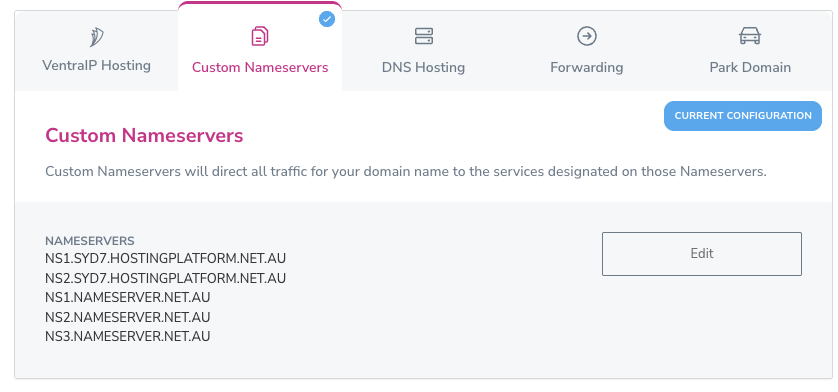
You will need to update your domain to use a consistent set of Nameservers to ensure that your domain resolves correctly. To remove any conflicts:
- Login to VIPcontrol and navigate to My Services → Domains → DNS
- Under Custom Nameservers tab, click ‘Edit’
- Remove the conflicting Nameservers by deleting the text and using the ‘x’ button to remove any empty boxes, leaving only one set of Nameservers present. Click ‘Save Changes’ once done.
What Nameservers should I use?
- VentraIP Hosting: Use this option if you have a cPanel web hosting service with us.
- Custom Nameservers: You can set custom Nameservers if you are using a external DNS or hosting provider.
- DNS Hosting: This will set the domain to use our included DNS hosting.
- Forwarding: Use this if you would like to use our included DNS hosting to forward your domain or emails.
- Park Domain: Use this option if you’re not ready to use your domain just yet.
