


Support Centre
Find the answers to your questions and get the support you need with the VentraIP help centre.
Browse by Popular

Domain Name
- What is a domain name?Eligibility criteria for registering .AU domain namesPremium domain names explained

Web Hosting
View All
Email Hosting
- Outlook 365 (Classic) Email Setup GuideMail app setup for iOS (iPhone + iPad)Gmail (webmail) email setup

Google Workspace
- Getting Started with Google WorkspaceGoogle Workspace support resourcesTransferring an existing Google Workspace service to VentraIP

Account
- How do I reset my VIPcontrol password?How do I create a VentraIP account?How can I see who accessed my VentraIP account?

Troubleshooting
- How do I clear my browser cache?Troubleshooting a ‘500 internal server' errorTroubleshooting with a ping test
Orders Flagged for Review – Existing Customers
Note: If you are a new customer, please refer to this guide here.
In order to protect your account, our system may flag an order if it detects anything suspicious about it. Any orders flagged will be either manually reviewed by our team or can now be expedited yourself. Here’s what to do next!
Reviewing flagged orders
Any orders that are flagged will be manually reviewed by a human on the same day. Otherwise you can expedite this yourself through VIPcontrol, here’s how:
- Log in to VIPcontrol.
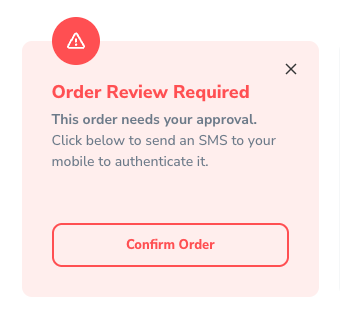
- Click the ‘Confirm Order’ button within the tile on the dashboard.
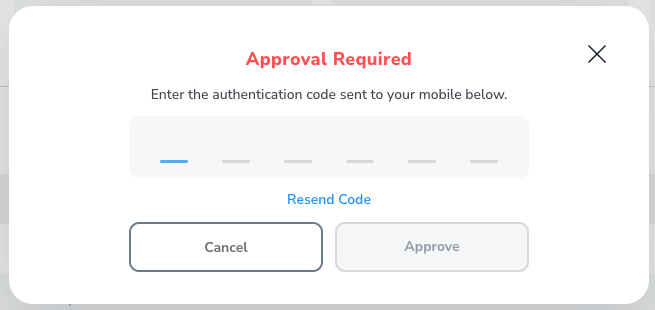
- Enter the authentication code sent to your phone and click on ‘Approve’ to validate the order.
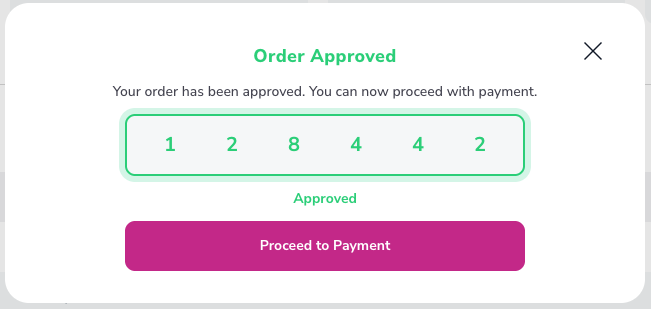
- Once approved click on ‘Proceed to Payment’ to complete the order.
Reasons for flagged orders and payments
Some common reasons why the order will be flagged for manual review are:
- Your detected location and the billing address provided are too far apart.
- The use of a VPN that’s far away from the billing address.
- The country the credit card issuer is in is different from the country you’re in.
- The order originated from outside Australia or New Zealand.
If the order is flagged, we will not take payment. If the order is manually reviewed and accepted, any invoices will remain unpaid.

We Are Here to Help You
Get in touch with one of our local experts at any time.