


Support Centre
Find the answers to your questions and get the support you need with the VentraIP help centre.
Browse by Popular

Domain Name
- What is a domain name?Eligibility criteria for registering .AU domain namesPremium domain names explained

Web Hosting
View All
Email Hosting
- Outlook 365 (Classic) Email Setup GuideMail app setup for iOS (iPhone + iPad)Gmail (webmail) email setup

Google Workspace
- Getting Started with Google WorkspaceGoogle Workspace support resourcesTransferring an existing Google Workspace service to VentraIP

Account
- How do I reset my VIPcontrol password?How do I create a VentraIP account?How can I see who accessed my VentraIP account?

Troubleshooting
- How do I clear my browser cache?Troubleshooting a ‘500 internal server' errorTroubleshooting with a ping test
Changing Your VIPsite Website’s Contact Information
To update your sites contact information follow these steps:
- Navigate to the VIPsites Website Editor.
- From the editor, click ‘Settings’ → ‘Contact Information’.
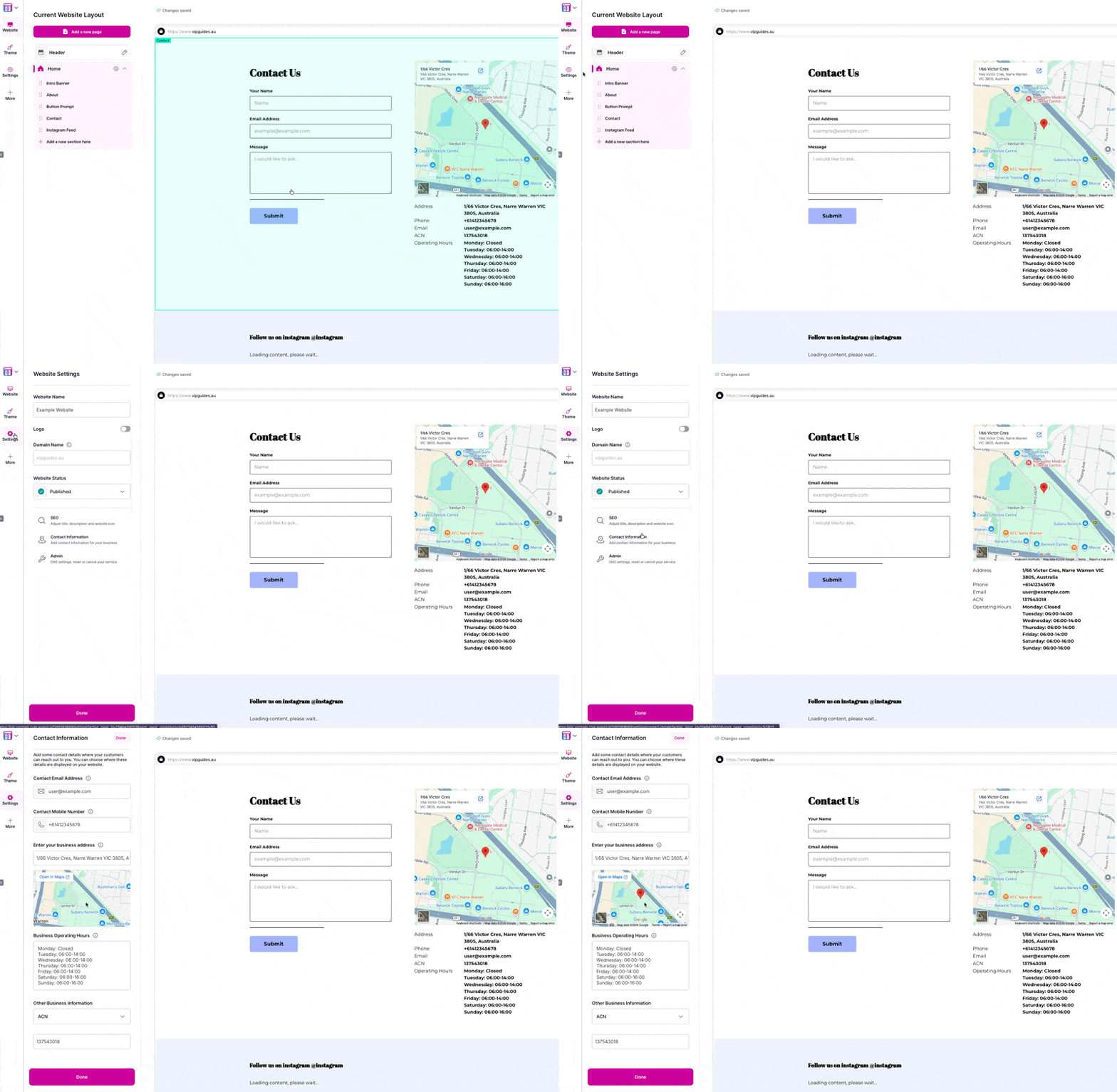
- From there you’re able to adjust any of the following:
- Contact Email Address: Enter an email address you would like your customers to contact you on. If you use the contact form section, this will also be the email address those enquiries will be sent to.
- Contact Phone Number: If you elect to display your phone number on your website, this will be the number that will be displayed.
- Enter your business address: If you choose to display a contact us section, you can display this address on Google Maps.
- Business Operating Hours: You can enter your businesses opening hours if you choose to display them.
- Other Business Information: You can enter your businesses ABN/ACN to display in the contact us section.
- Once it’s filled out, click ‘Done’.
Thats it! you’ll be able to use the contact information to setup a contact form or display the information on your website!

We Are Here to Help You
Get in touch with one of our local experts at any time.