
Support Centre
Find the answers to your questions and get the support you need with the VentraIP help centre.
Browse by Popular

Domain Name
- What is a domain name?Eligibility criteria for registering .AU domain namesPremium domain names explained

Web Hosting
View All
Email Hosting
- Outlook 365 (Classic) Email Setup GuideMail app setup for iOS (iPhone + iPad)Gmail (webmail) email setup

Google Workspace
- Getting Started with Google WorkspaceGoogle Workspace support resourcesTransferring an existing Google Workspace service to VentraIP

Account
- How do I reset my VIPcontrol password?How do I create a VentraIP account?How can I see who accessed my VentraIP account?

Troubleshooting
- How do I clear my browser cache?Troubleshooting a ‘500 internal server' errorTroubleshooting with a ping test
Creating Additional Users Within cPanel (Manage Team)
The Manage Team interface allows you to create and manage additional cPanel account logins.
Create a new user
To create a new user:
- Log in to your cPanel account.
- Click on the Manage Team icon on the left-hand side.
- Click ‘Create Team User’
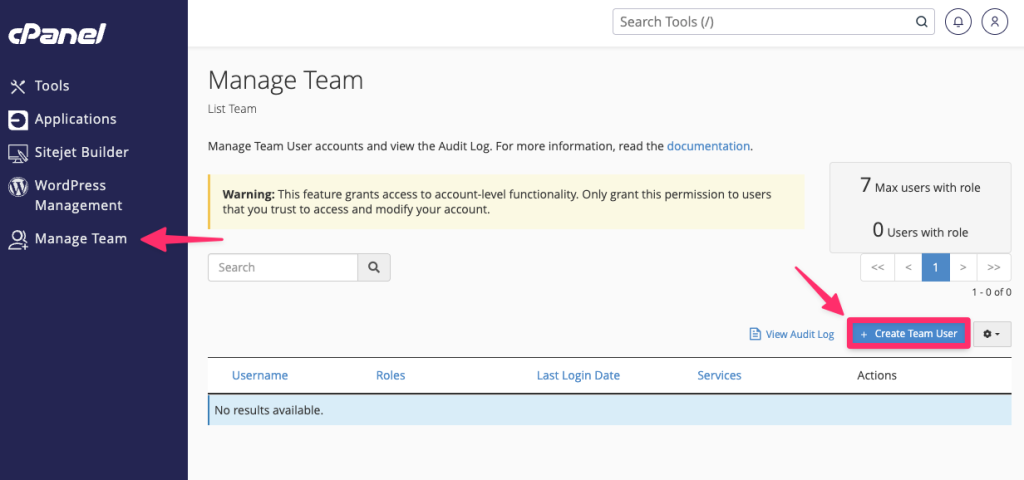
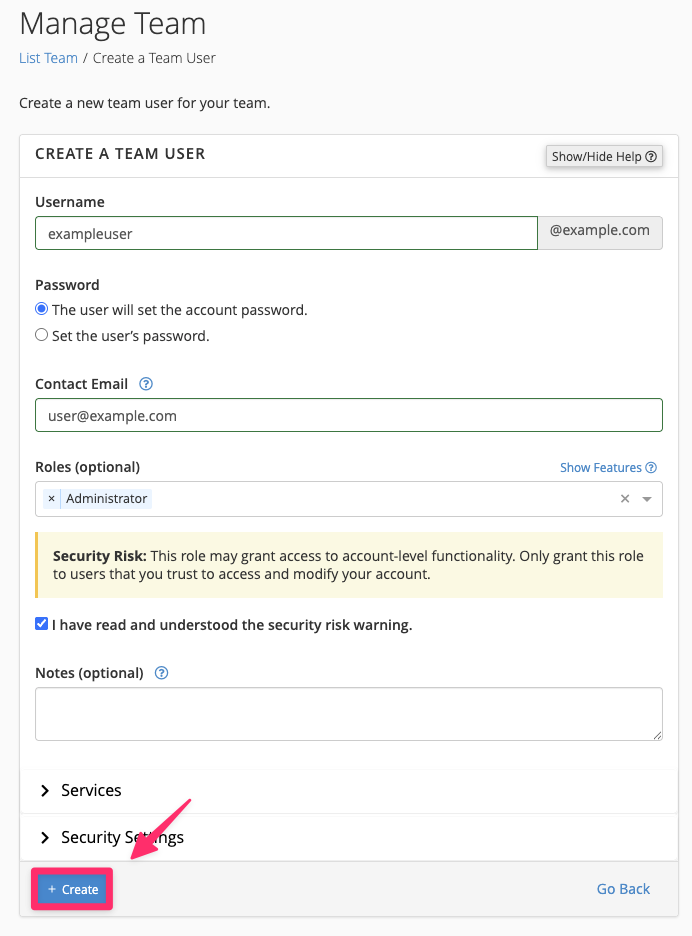
- From there, you’ll be presented with the user creation screen:
- Username: Enter a username for the user
- Password: Set a password or allow the user to set one
- Contact Email: Set a contact email for the user so they can receive system emails (e.g., Password resets or notifications)
- Roles: Select the roles that you would like the user to have. (see the Roles heading below for more information)
- Notes: Optionally enter any notes under the account
- Services: Enable any extra services for the user (e.g., Email, FTP access or Web Disk)
- Security Settings: You can enter an expiry date for the users’ access if you only need to allow temporary access.
- Once you have filled out the users information, click ‘Create’
- When the user is created, an email will be send to the contact email that was entered earlier with their login information.
Roles
Below is a table with a full list of roles and what access they have to elements of your cPanel account.
| Role | Description | Interface access |
|---|---|---|
| Administrator | The administrator role includes all privileges of the other team user roles. |
All interfaces except for:
|
| Database | This role enables a team user to access tools and modify files related to database management for the cPanel account. |
|
| This role enables a team user to access tools and modify files related to email administration for the team owner’s cPanel account. |
|
|
| Web | This role enables a team user to access tools and modify files related to website functionality. |
|

We Are Here to Help You
Get in touch with one of our local experts at any time.