


Support Centre
Find the answers to your questions and get the support you need with the VentraIP help centre.
Browse by Popular

Domain Name
- What is a domain name?Eligibility criteria for registering .AU domain namesPremium domain names explained

Web Hosting
View All
Email Hosting
- Outlook 365 (Classic) Email Setup GuideMail app setup for iOS (iPhone + iPad)Gmail (webmail) email setup

Google Workspace
- Getting Started with Google WorkspaceGoogle Workspace support resourcesTransferring an existing Google Workspace service to VentraIP

Account
- How do I reset my VIPcontrol password?How do I create a VentraIP account?How can I see who accessed my VentraIP account?

Troubleshooting
- How do I clear my browser cache?Troubleshooting a ‘500 internal server' errorTroubleshooting with a ping test
Cloning a website using WordPress Management
If you haven’t already installed or imported an installation into cPanel’s WordPress Management, you will need to do that first.
Here are the steps you need to take to clone an existing WordPress installation.
- Log in to cPanel.
- Click on WordPress Management under Applications.
- Click on the Clone option in your installation’s details.
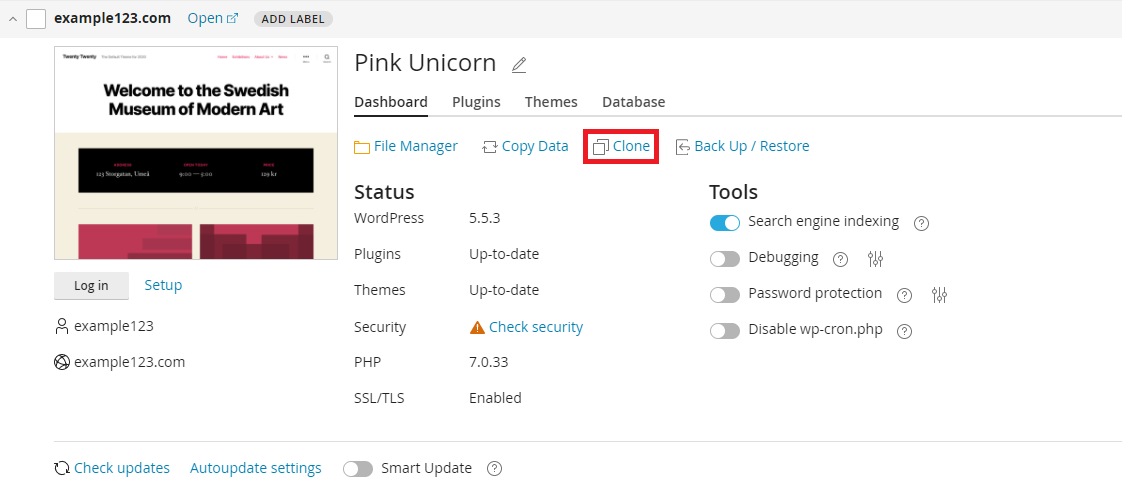
- Some cloning options will appear, giving you the following options:
- Create subdomain: this option will allow you to create a new sub-domain of your primary domain with a copy of your existing website.
- Use existing domain or sub-domain: this option will allow you to select an existing domain or sub-domain you have setup, to clone your website to.
- Database: some advanced users might want to change the database name, but it’s not necessary.
- Click Start to begin the cloning process.

We Are Here to Help You
Get in touch with one of our local experts at any time.