


Browse by Popular

Domain Name
- What is a domain name?Eligibility criteria for registering .AU domain namesPremium domain names explained

Web Hosting
View All
Email Hosting
- Outlook 365 (Classic) Email Setup GuideMail app setup for iOS (iPhone + iPad)Gmail (webmail) email setup

Google Workspace
- Getting Started with Google WorkspaceGoogle Workspace support resourcesTransferring an existing Google Workspace service to VentraIP

Account
- How do I reset my VIPcontrol password?How do I create a VentraIP account?How can I see who accessed my VentraIP account?

Troubleshooting
- How do I clear my browser cache?Troubleshooting a ‘500 internal server' errorTroubleshooting with a ping test
Removing DNSSEC Data From Your Domain
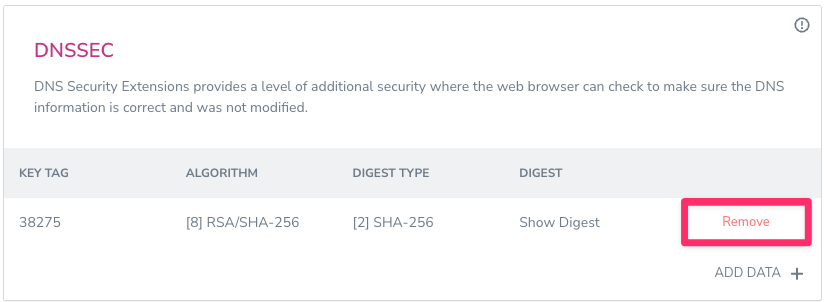
To remove DNSSEC data from your domain, you can follow these steps:
- Log into VIPcontrol.
- Navigate to ‘My Services’ → ‘Domains’ and click on ‘DNS’ next to your domain.
- Scroll down to the bottom till you find the DNSSEC heading.
- In the table is your DNSSEC data, click on ‘Remove’ next to each entry.
What is DNSSEC?
DNSSEC adds cryptographic signatures to existing and new DNS records within that same DNS zone. These signatures are stored in the DNS name servers and an associated DS (Delegation Signer Records) record is generated, and then added at a registrar level (which is the data that you see/add within VIPcontrol).
This chain of trust verifies that when a DNS lookup is performed on your domain, the DNS records are coming from the authorised zone and nowhere else.
When this can cause issues?
If you update your domains Nameservers to something different, the new DNS zone under new Nameservers you set no longer contain the cryptographic signatures signed to them, which causes DNS resolution to stop as the new zone cannot be verified.
